The live hub for Model UN conferences

Run your MUN,
simply.

Points, roll call, resolutions, approval, printing and help requests, live on every chair's laptop and phone. So simple a first-time chair gets it in five minutes.

Free demo · no sign-up · nothing to install
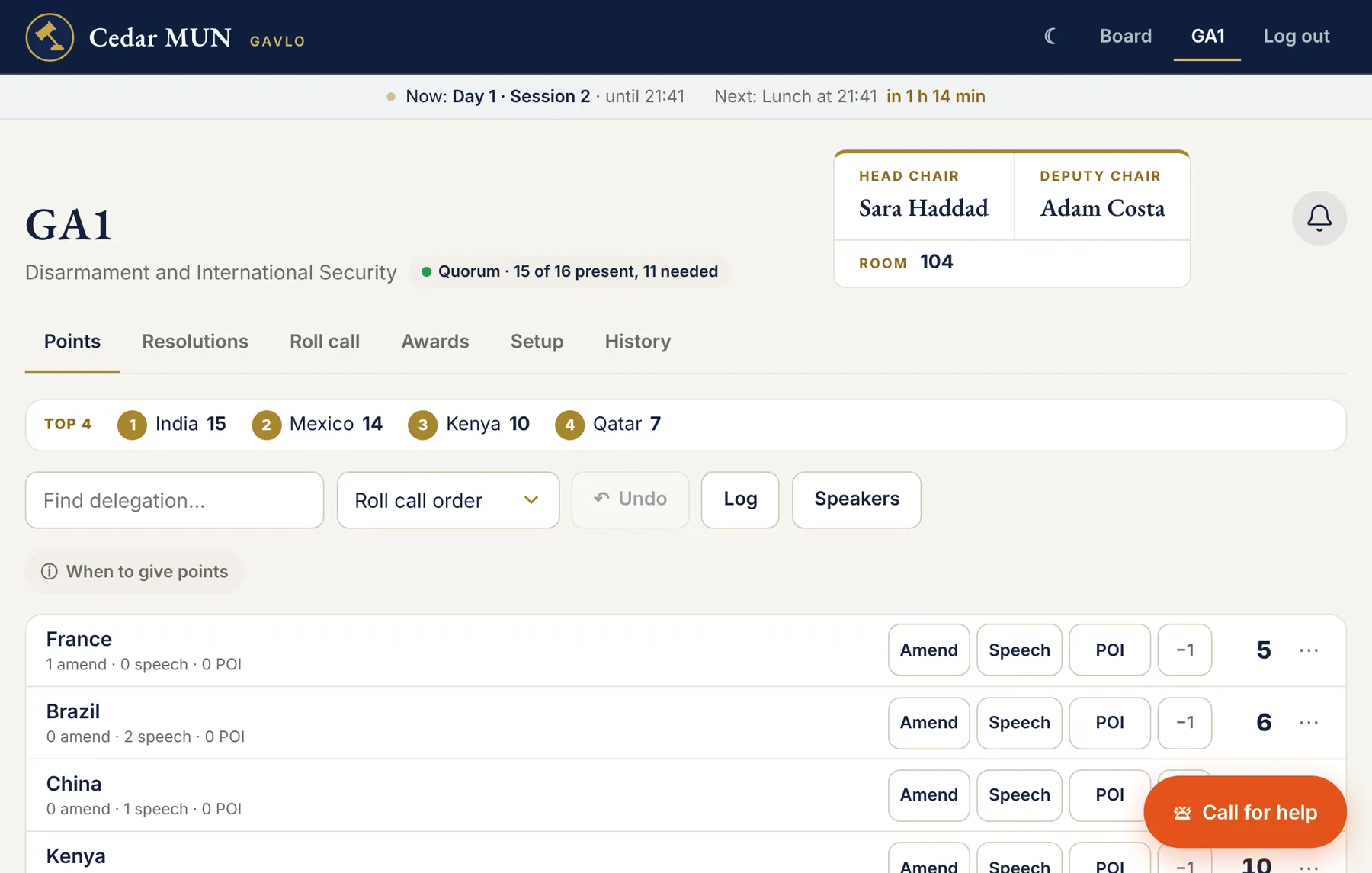
gavlo · your conference
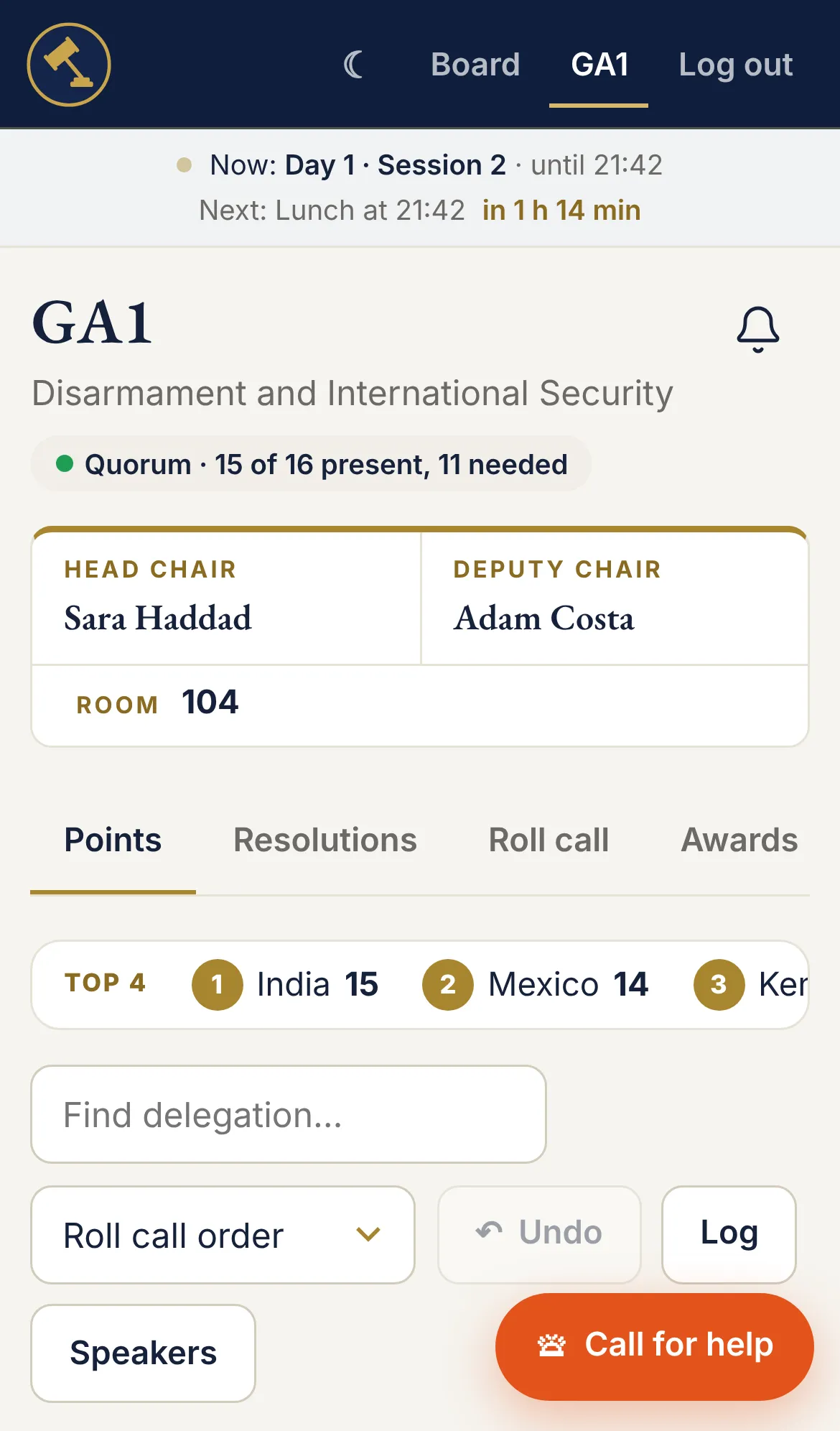
A chair's page in Gavlo
Gavlo on a phone
+3 speechKenya now has 13 points
Approved · sent to printGA1 · Resolution 3 · 18 copies
IT is on the wayProjector · Room 106
“
It was my first time chairing, and it was so easy to use.
First-time chair · Model UN conference in Doha, November 2026

Why Gavlo

Everything your conference needs.
Simple enough for any chair.

Every tool your chairs, approval panel, IT team and executives use, in one place. And so clear that even a first-time chair picks it up in minutes.

Powerful, but one tap

Big buttons that say what they do. Tap Speech, tap 3, done. No menus, no jargon, no manual.

Everyone sees only their job

Each role has its own password and its own page, so nobody is lost in buttons that aren't theirs.

Live, even on school Wi-Fi

Changes reach every screen in about a second. If the Wi-Fi drops, keep tapping. It catches up by itself.

Features
One hub. A page for every role.

Everything a chair needs. Nothing they don't.

  • Points in one tap. Speech, POI or amendment, then the amount. Undo, notes and a full points log.
  • Roll call with live quorum. P, PV or A per country, or copy the last session.
  • Speakers list. Tap countries in order, then Next. Always shows who's up.
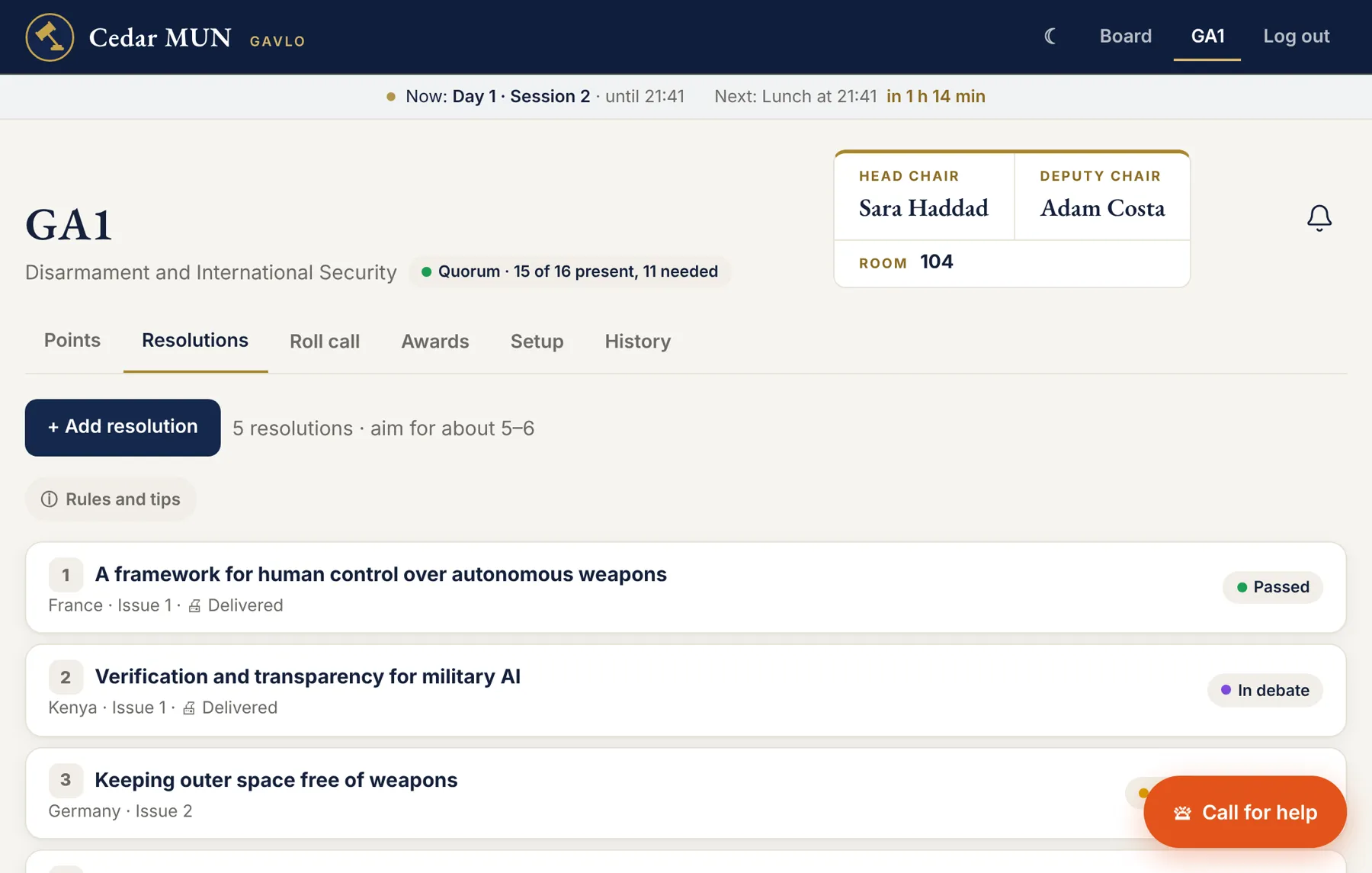
  • Resolutions to the vote. With the panel's feedback right where chairs need it.
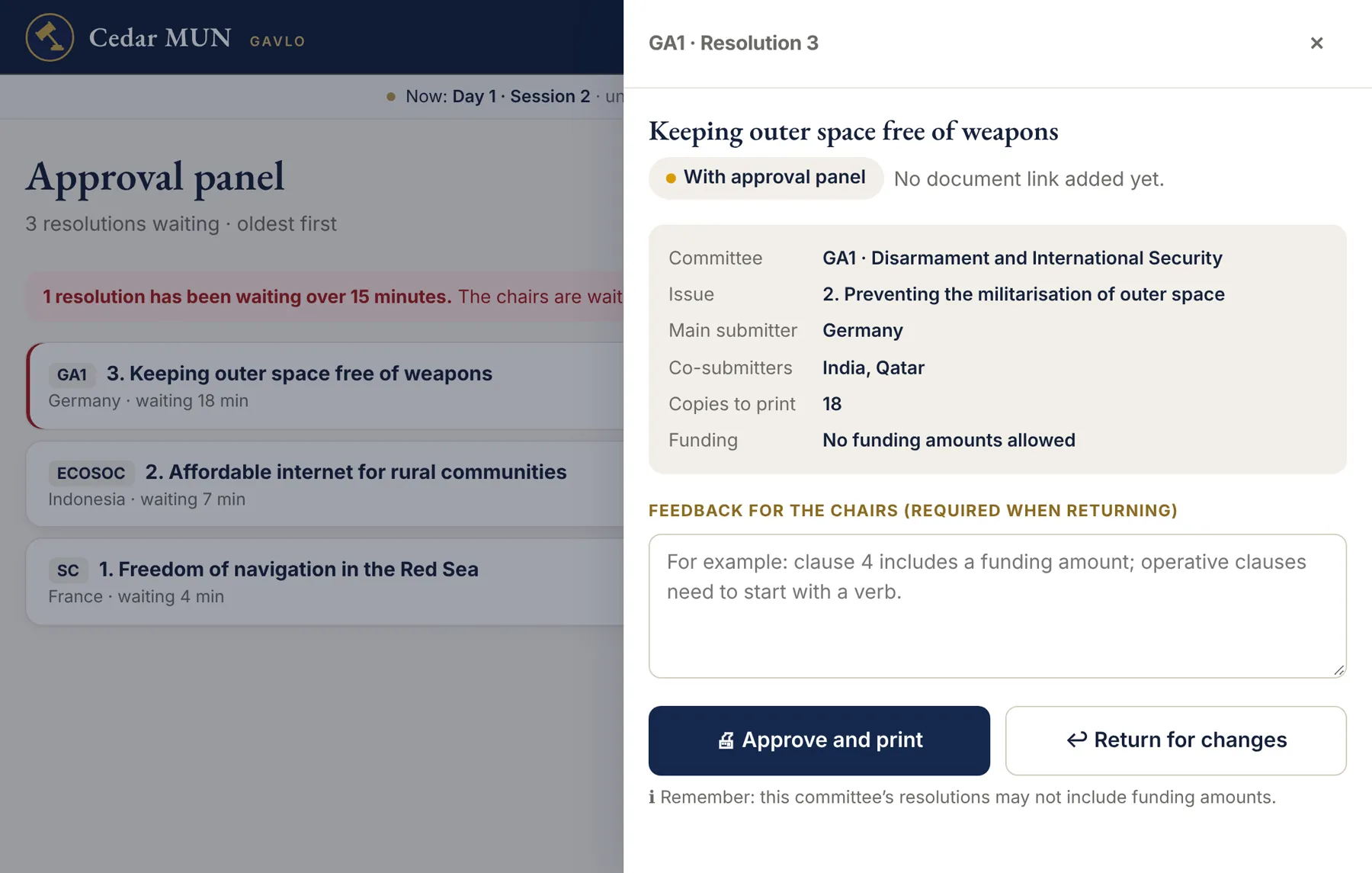
Resolutions tab

A clear queue, oldest first.

  • Every resolution waiting, from every committee, with how long it has waited.
  • Approve and print in one tap. It goes straight to IT's queue.
  • Return with feedback the chairs see straight away.
  • 15-minute warning so nothing gets forgotten.
Approving a resolution

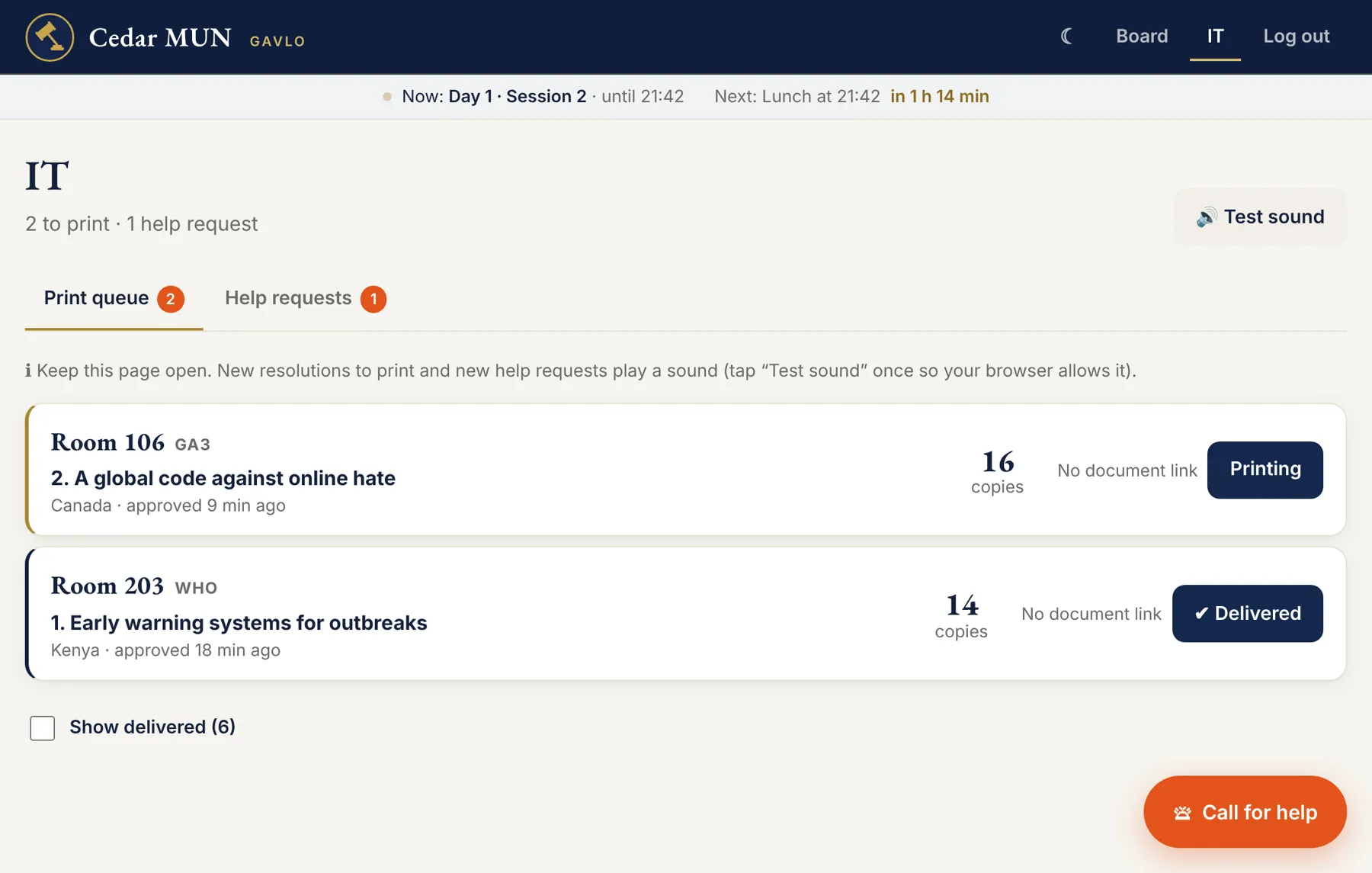
The right copies, to the right room.

  • Print queue of approved resolutions, with the copies and the room number.
  • Printing, then Delivered. Chairs see it on their page.
  • Tech help requests from chairs: projector, Wi-Fi, sound, with the room.
  • A sound alert when something new arrives.
IT print queue

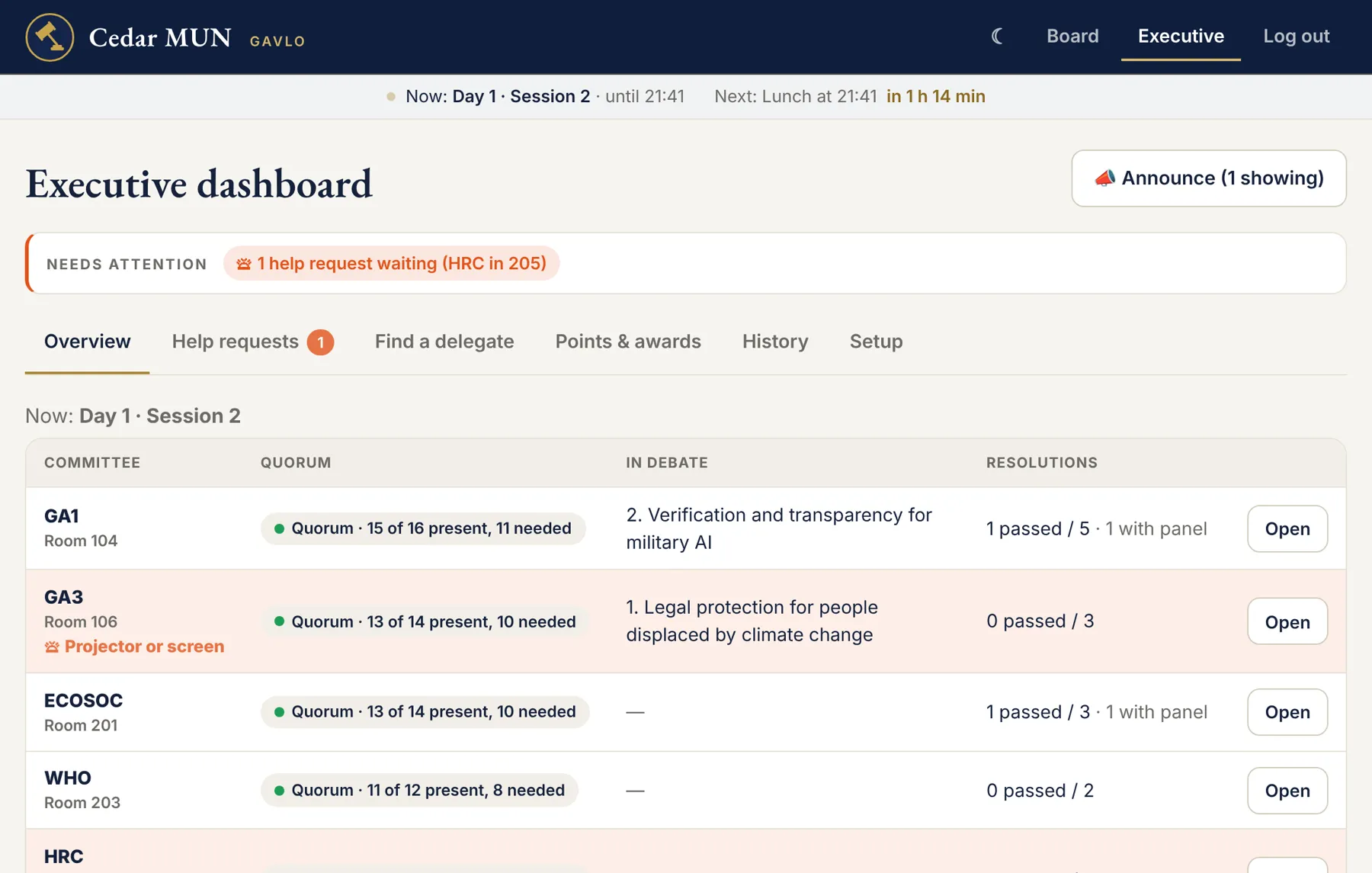
The whole conference on one screen.

  • Overview of every committee: quorum, debate and results.
  • Needs attention: help requests, missing roll calls, stuck resolutions.
  • Announcements to everyone, a role, or one committee.
  • Export to Excel: results, points, awards, roll calls and history.
Executive overview

See it in action

Things that used to take minutes.
Now they take seconds.

01Give pointsTap Speech, POI or Amend, then the amount.
02Approve and printStraight from the panel to IT's queue.
03Call for helpChairs call IT or the executives, with the room.

Everything included

Every feature, in every plan.

PointsSpeeches, POIs, amendments
Deductions & Undo−1 for misconduct, notes
Points logFor the committee or one country
Roll callP, PV, A and live quorum
Speakers listOrder, reorder, Next
ResolutionsFrom drafting to the vote
VotesIncluding house divided
Approval panelApprove or return with feedback
Print queueCopies, rooms, delivered
Call for helpExecutives or IT, with the room
AnnouncementsTo everyone or one committee
Updates bellApproved, printed, help coming
Status boardEvery committee, live
Session barTime left and what's next
Exec overviewQuorum and progress at once
Needs attentionWhat's stuck, right now
Find a delegateBy country, name or school
AwardsBest Delegate, Honourable Mentions
Excel exportResults, points, awards, history
Spreadsheet uploadEvery delegation in one go
Change historyWho did what. Can't be edited
Role passwordsChanged in seconds
Your brandingYour name, logo and dates
Any deviceLaptop, iPad, phone. Dark mode

Pricing

One price. Everything included.

Demo

Free

See exactly what your team will use.

  • Every role: chair, panel, IT, executive
  • A full sample conference
  • No sign-up, nothing to install
Open the demo

Conference

300 QAR

US$79 · one payment per conference

  • Every feature, for every committee
  • Your conference's name, logo and dates
  • We set up your committees, chairs, rooms and schedule
  • Your own private, secure database
  • WhatsApp support on the conference days
  • Excel exports of everything afterwards
Get Gavlo

FAQ

Questions, answered.

Anything else? Ask us below.

Do delegates need to use it?

No. Gavlo is only for your staff: chairs, the approval panel, IT and the executives. Delegates and visitors only see a sign-in page.

What do we need to install?

Nothing. It opens in any browser on a laptop, iPad or phone. Staff open the link and type their role's password.

How long does setup take?

Send us your committees, chairs, rooms and schedule, and we set it up, usually within a couple of days. Delegations can be uploaded from a spreadsheet.

What if the Wi-Fi goes down?

Chairs keep working. A yellow bar shows they're offline, and everything syncs as soon as the connection is back.

Is our data private?

Yes. Your conference gets its own database, each role has its own password, and the database itself checks who may change what. A GA1 chair can't touch GA3. Every change is recorded.

Can we keep our data afterwards?

Yes. Executives download results, points, awards, roll calls and the full history as spreadsheets for Excel or Google Sheets.

Can we use our own points system?

Yes. You set the usual points for a speech, POI and amendment, and each committee can adjust its own.

Bring Gavlo to your conference.

Tell us a little about your conference. We'll reply within a day and have you set up well before opening ceremony.

Or try the demo first